CHEQ HOMEPAGE
REDESIGN
Scaling a single product home screen into a
multi-product, personalised experience
If you can read this line, it means this case study is still a work in progress.
You can still read it though. It already has plenty of good stuff in it.

CheQ is a FinTech app aiming to be a one-stop solution for credit management. With this goal, it was launched in 2023 and currently has over 400K users. We help users pay their credit card and utility bills, manage loans, and get personalized guidance to improve their credit score.
BACKGROUND
In 2023, the 1st version of the CheQ app was built as a simple solution to pay credit card bills seamlessly. The homepage focused on showing bill status and enabling quick payments.
Over the months, the product expanded significantly. Utility bill payments, Instant Loans, Rent and School Fee payments, a CheQ Wallet, and an AI tool were all added to the platform. Each new product was shipped the same way - a banner on the homepage.
By 2024, the homepage looked like a rotating notice board. Product visibility was managed manually. Every week, PMs from each product team would request their product be featured as the hero banner. There was no system, no logic, and no scale.
2023
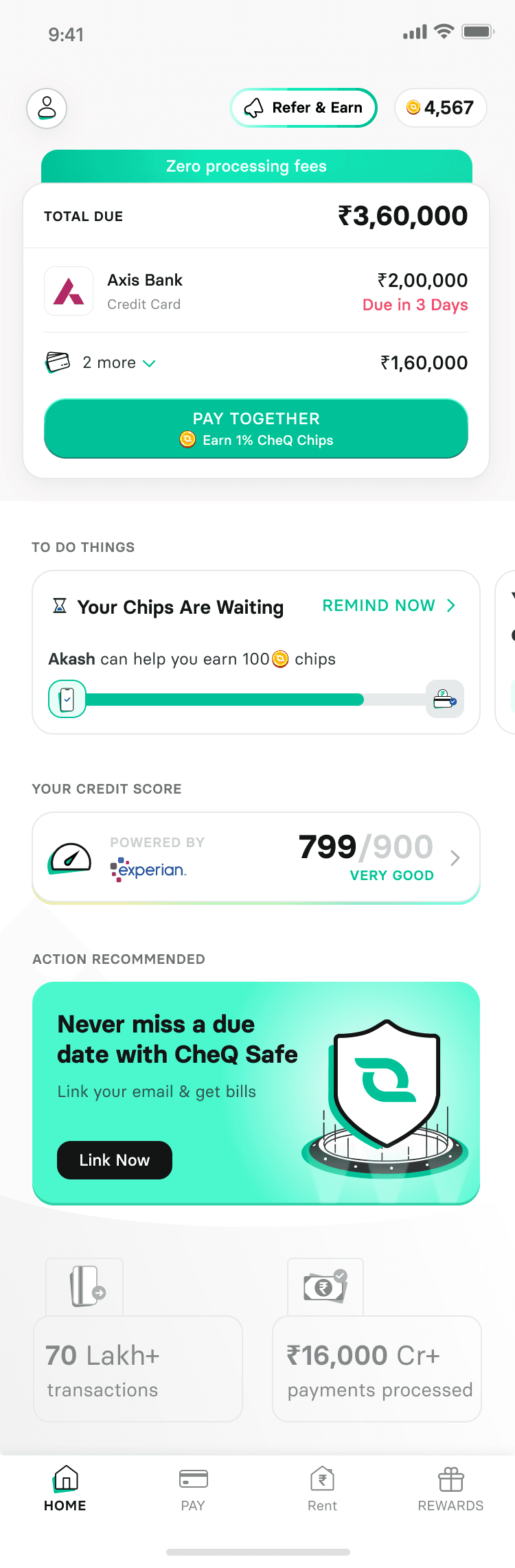
2024

THE PROBLEM

FOR BUSINESS
The homepage had become a bottleneck. With 5+ products competing for a single banner slot, most products had near-zero visibility on any given week. Product adoption was being gated by who asked loudest, not by user need or business priority.

FOR USERS
The homepage was failing at basic relevance. A user visiting to pay their electricity bill was shown a loan offer. A user who needed a loan had to hunt past credit card promotions. The homepage was not reading intent. It was broadcasting a single message to everyone

FOR DESIGNERS & PM
The entire product surface was image powered. Every banner, every tile, every widget was a static image. This meant there was no way to personalise content, show different offers to different user cohorts, suppress irrelevant products, or let a backend engine make decisions about what a specific user should see.
HOW MIGHT WE !
How might we design a homepage that serves multiple user intents simultaneously, scales with new products, communicates CheQ's value proposition, and supports personalisation?
All this without requiring manual intervention every week!
DEFINING SUCCESS
Before opening any design tool, I sat with the PMs of every product team, Marketing & Partner management teams to align on what success would look like for each of them. This was a deliberate choice. It meant the final design could be evaluated against real outcomes, not just aesthetics.
PM: Credit Card Bills
Get newly onboarded users to set up their cards immediately.
D0 Setup Rate
45%
Current
➡️
65%
Target

PM: Utility Bills
Drive repeat utility payments and grow the share of users who transact on utility, not just click through.
Homepage visits to Utility
-
Current
➡️
Repeat payments
Target

PM: Loans
The product existed but users weren't finding & visiting the Loan option page.
Homepage Loan banner click
8%
Current
➡️
-
Target

Marketing
The homepage needed to actively communicate that CheQ is the most rewarding bill payment app.
Static banners weren't doing this.

Partner Management
Users were not engaging with the partner brand ads & the vouchers. This costs us money
This alignment exercise produced something valuable beyond just metrics: it gave every stakeholder a shared understanding that the homepage had to serve multiple goals simultaneously, and that no single product could own the surface.
USERS & COHORTS
Before any design work began, it was important to understand who was actually using the homepage and why.
CheQ's user base wasn't homogeneous. Different cohorts visited the app at different times of the month, with fundamentally different primary intents.
Credit Card users
Visited the app weekly or monthly, typically in the days approaching their bill due date. Their job was to pay their card bill. Everything else was noise.
Utility Bill payers
Visited at the end of the month for electricity & postpaid bills and throughout the month for recharge, and FASTag payments. They were often unaware CheQ offered anything beyond bill payment.
Loan Seekers
Visited irregularly, driven by a specific financial need. They needed the product to be immediately discoverable since they were unlikely to search for it.

New Users
Visited in their first 1–3 days after signup. They needed to set up their credit cards to unlock CheQ's core value. If this didn't happen quickly, retention dropped sharply.
KEY DATA SIGNALS
Only 45% of newly onboarded users completed credit card setup in their first session.
This is a significant leak given acquisition costs
Homepage scroll depth was approximately 40%
Most users never saw content below the first two banners
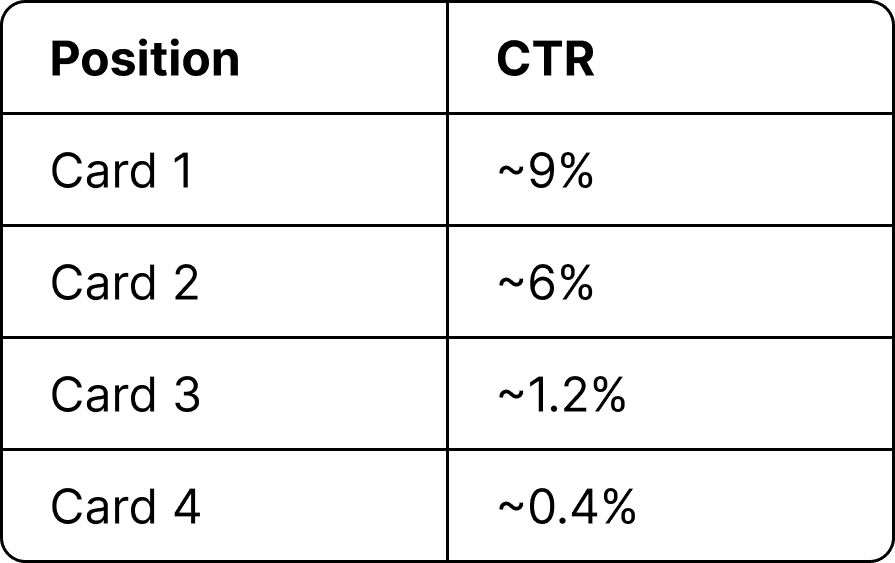
Banner CTR for products in position 3 or 4 on any given week averaged under 2%
Compared to 8–11% for the top banner
Session recordings showed a consistent pattern: Land, find primary action, leave.
Most users never saw content below the first two banners
Many users were unaware CheQ offered loans or rent payment.
A common response: "I thought this was just for Bill payments."
PHASE 1
AUDITING THE HOMEPAGE
The original homepage was built around a single rotating hero banner, swapped manually each week based on whichever PM requested visibility for their product. When CheQ had one product, this worked. By the time the platform had expanded to five, it had become a queue. Whatever product wasn't featured that week effectively didn't exist on the homepage.
Rough engagement data showed that the CTR of such featured banner approximately was in the range of 8-12%
The operational problem was just as clear. Every Monday, PMs from Loans, Utility, Rent, and Wallet would each make a case for their product to be that week's banner. There was no framework for these decisions. Products would go 3–4 weeks without homepage visibility with no way to measure what that was costing in activation or retention.
PHASE 2
EXPERIMENTS
Rather than jump straight to a redesign, I ran two sequential experiments within the existing architecture. Both used image-based widgets with the constraint of not touching native code but tested fundamentally different interaction models.
SCROLL CAROUSEL
The first hypothesis was straightforward: if users can't see all products in one banner slot, give them a way to scroll through them.
I introduced a horizontal scroll widget showing 4 products as cards. The idea was to preserve the "one promoted product" visual weight while letting users swipe to discover more.
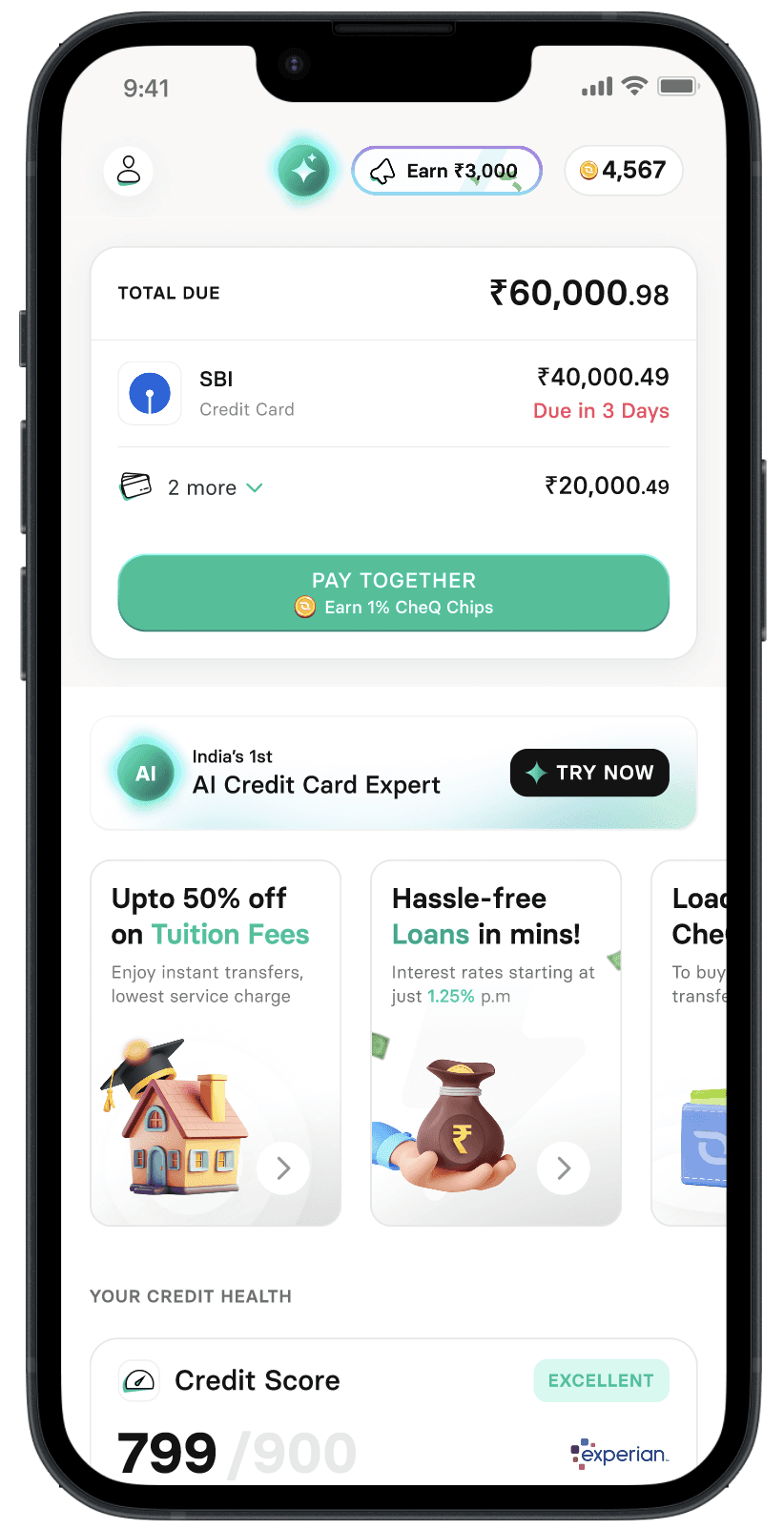
Hypothesis:
Users will scroll to discover products they need.
Reality:
Scroll completion on the widget was approximately 22%.
That means nearly 4 in 5 users never saw the third or fourth product.
Learning:
The scroll pattern wasn't intuitive in this context. Users didn't know there was more content. The affordance wasn't clear enough. We had moved from one visible product to effectively 2½ visible products. The discovery problem was still there, just slightly less bad.
2 x 2 TILE (BENTO)
The scroll experiment revealed that the problem wasn't about giving users more content to scroll through. It was about simultaneous visibility. If users had to work to discover products, they wouldn't.
The second hypothesis shifted: show all four products at once with equal visual weight and let users self-select.
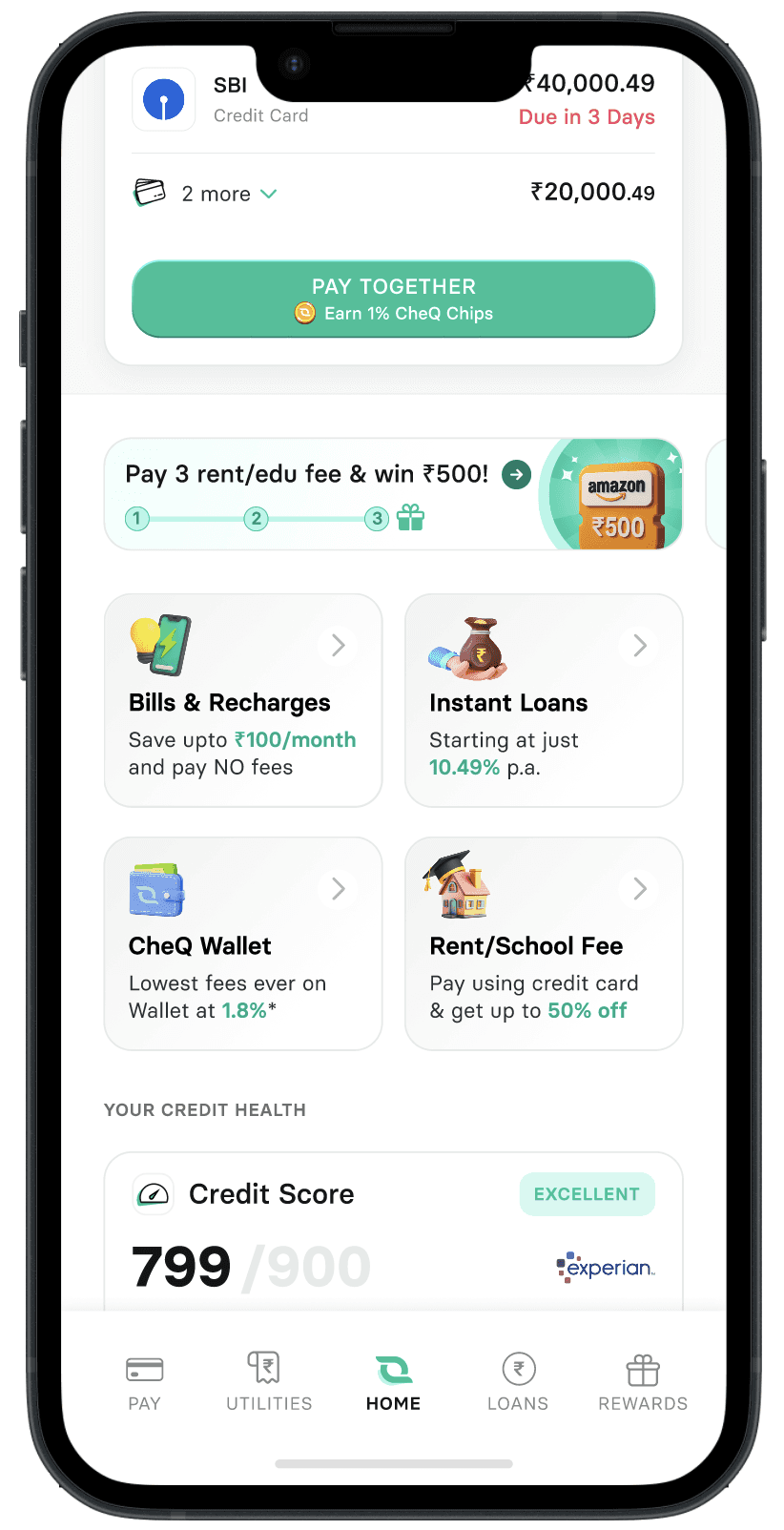
I designed a 2×2 grid tile layout where all four products visible above the fold, each with a label and a short value proposition line. No hierarchy, no rotation, no scrolling required.
This produced the first structured performance baseline across all products
The CTR numbers looked reasonable on the surface. But transactor share told a more important story. Only 26% of users who tapped Rent actually completed a payment. Only 28% of Utility taps converted to a transaction. Users were arriving at product pages without clear intent and dropping off inside the flow.
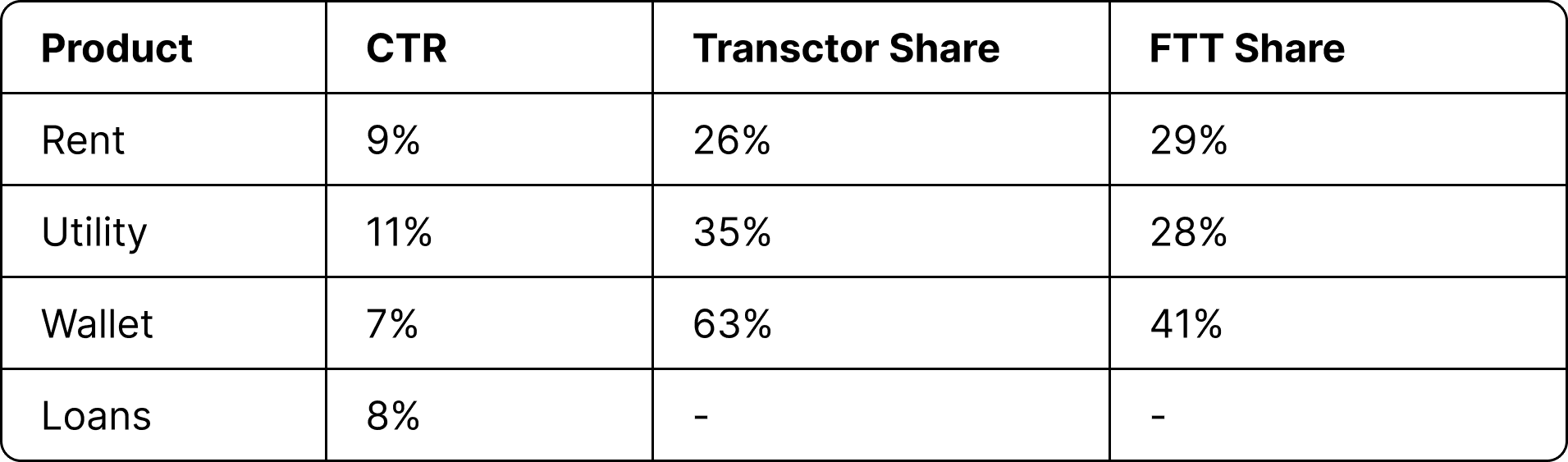
Learning:
The problem wasn't just visibility. It was intent quality. The banners weren't giving users enough context to self-select before tapping. The homepage needed to communicate what each product was and why it was relevant, not just that it existed.
WHY REDESIGN?
It seems like we solved for the problem that the PM's had. So what exactly did we redesign?
The vertical banner experiment had given us a working baseline and a clear direction. But before moving to a redesign, a harder constraint surfaced that made incremental improvements insufficient.
Every widget: Carousel, banner, tile - was image powered. This meant the entire homepage was static. The backend had no ability to influence what any individual user saw.
What this made impossible:
Showing different loan offers to users with different credit profiles
Suppressing the Loans tile for a user who had taken a loan two weeks ago
Running any content experiment without a full image redesign each time
Also, the earlier mentioned requirement of Marketing & Partner teams is still unresolved. The widget experiments had proven the right direction. The infrastructure now needed to catch up.
WIREFRAME
ITERATIONS
The Bento tile experiment answered one question: simultaneous visibility improves intent quality. But it was image powered. Means, it couldn't be personalised and had no way to accommodate the growing requirements from marketing and partner teams. Rebuilding natively expanded the scope significantly.
The wireframe challenge was no longer just about product tiles. It was about designing a complete homepage architecture that could support the Bento layout, a personalisation engine, a rewards surface, marketing positioning, and partner placements within a single scrollable screen. These three iterations were attempts to answer that question.
1
SECTION BASED
LAYOUT

Each product got its own labelled section with a header, content, and CTA. Clean and organized on paper. I tested this with internal users.
Feedback:
Users felt like a dashboard. The cognitive load of parsing six distinct sections on first open was too high. Users described it as "a lot to take in."
2
PROGRESSIVE
DISCLOSURE
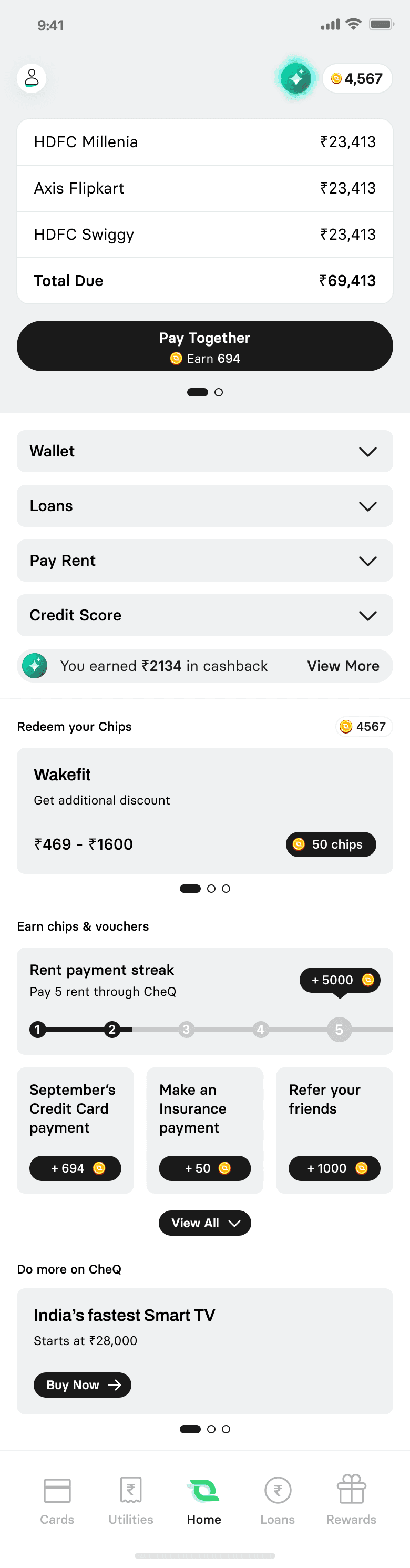
Bills at the top. Other products collapsed into expandable sections below.
Feedback:
Users didn't expand sections. The interaction cost of tapping to expand was just enough friction to prevent discovery. The problem we were trying to solve came back in a different form.
3
CARD FEED
HYBRID LAYOUT
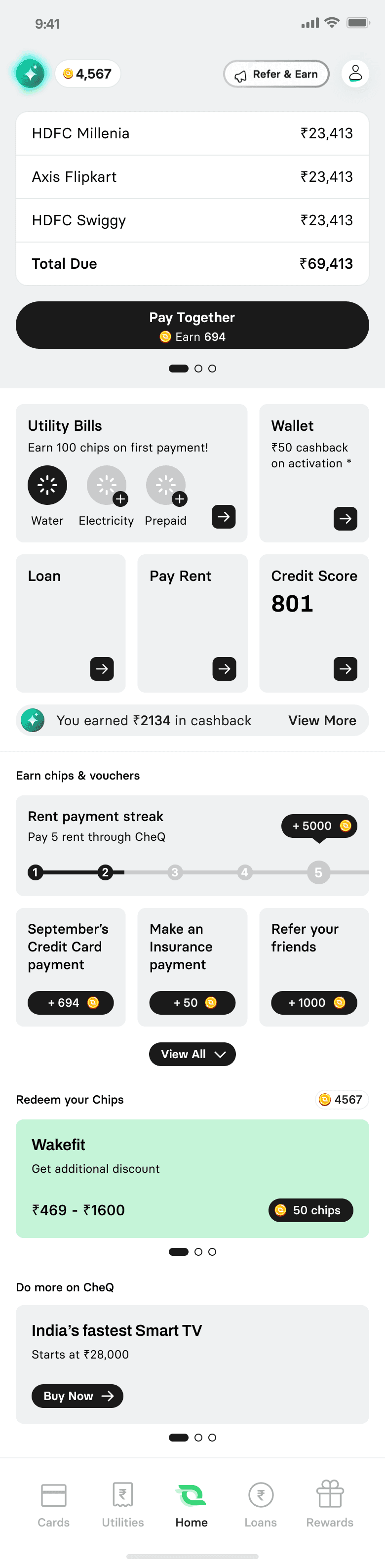
Persistent bill widget anchored at the top. Below it, a structured card feed with consistent visual rhythm. Each section has a clear header for scannability, but nothing requires a tap to be visible. Users can scroll through the full feed or stop at whatever is relevant to them.
Feedback:
Users found their primary action faster than the section-based layout. Secondary products were noticed naturally while scrolling as it was passive discovery without forced exposure.
On the Hybird approach, users found their primary action faster than the section-based layout. Secondary products were noticed naturally while scrolling as it was passive discovery without forced exposure.
This also supported scaling for the future products & thus we locked in on this wireframe
INTERFACE DESIGN
The wireframe validated the structure. The interface work validated the decisions within it..
With the wireframe direction locked, the plan included a moderated visual hierarchy test before moving to build. This was specifically to validate that the Pay Together CTA remained the dominant focal point and that the Bento grid tray was being read as a navigation element rather than another banner.
At this stage the project was running against a hard shipping deadline. Running a full visual test cycle would have pushed launch by 2–3 weeks. The decision was made in alignment with the PM and engineering lead to launch the first visual iteration directly and use live data as the validation layer.
This was a deliberate trade-off: accept the risk of a suboptimal first visual pass in exchange for getting real behaviour data faster than any moderated test could provide.
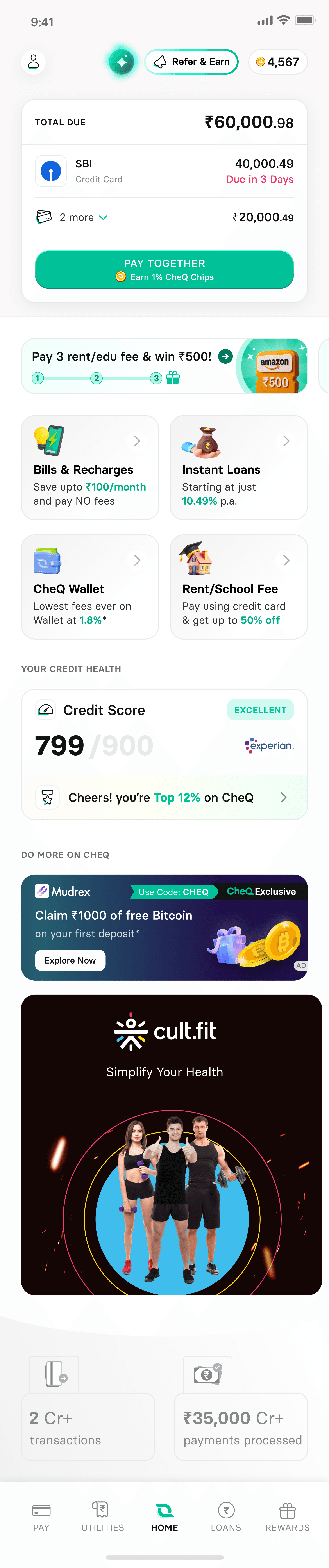
August 2025 & Earlier
From September 2025

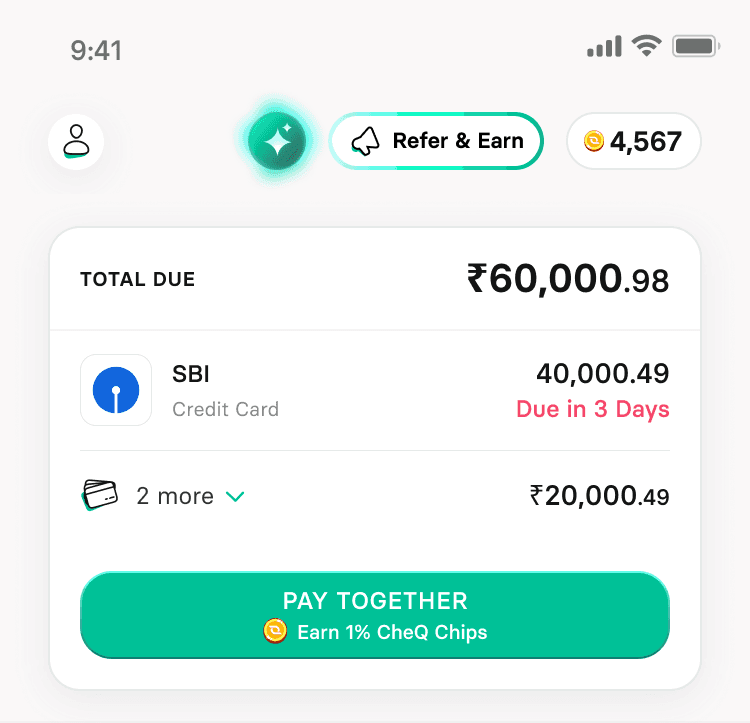
The original Bill Box was a basic widget that displayed only one credit card. Users had to navigate to another screen to see their Utility bills, adding unnecessary steps.
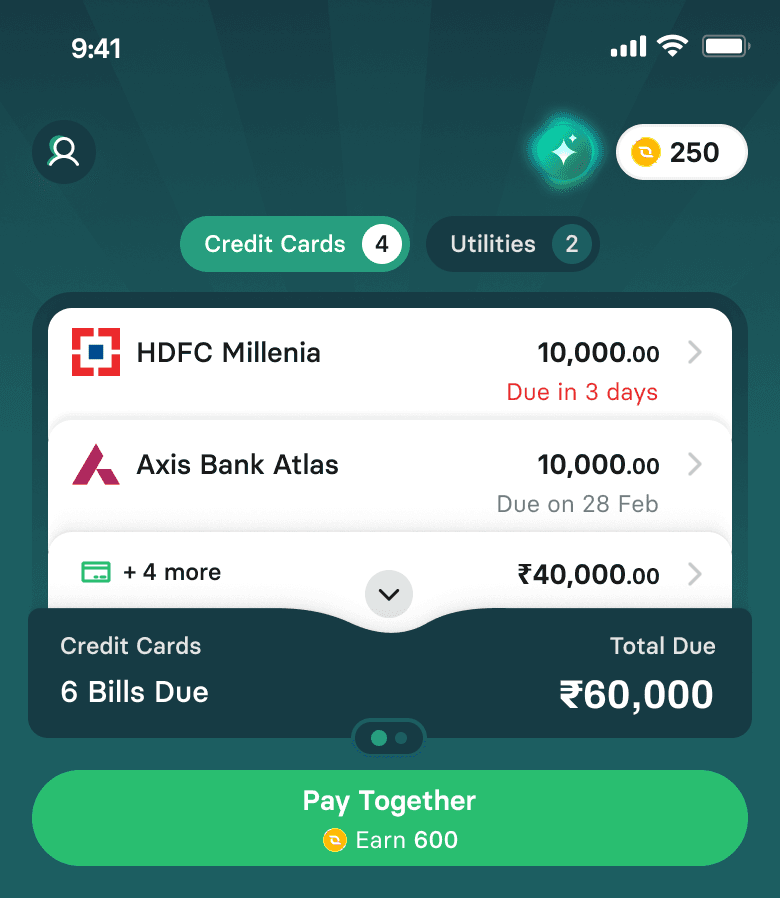
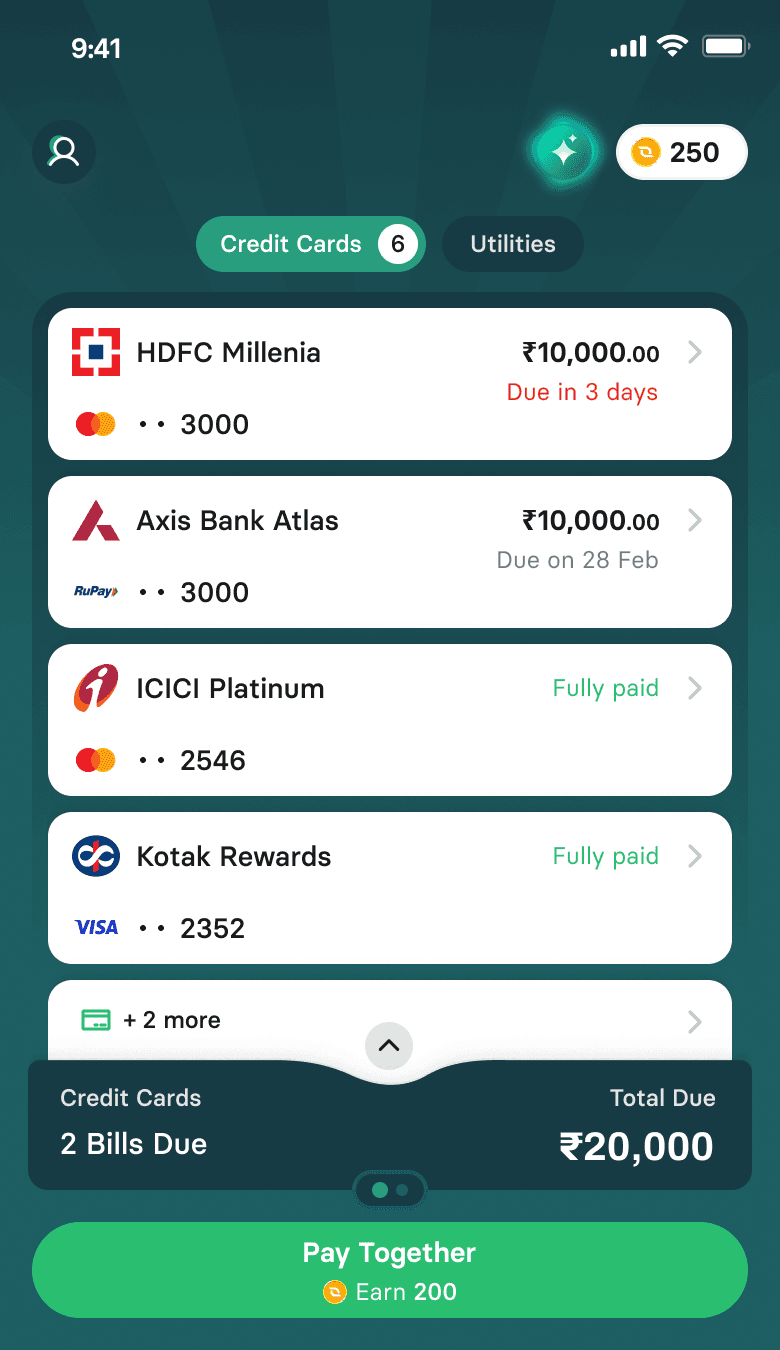
The redesigned Bill Box now displays up to four cards, providing an at a glance view of all upcoming bills.
A new "Pay Together" button not only simplifies the payment process but also proactively shows the exact amount of chips a user will earn, removing the mental friction of calculation and reinforcing CheQ's value proposition.
The most significant update is the inclusion of a dedicated section for utility bills, addressing a major user pain point and consolidating all bill management in one central location.
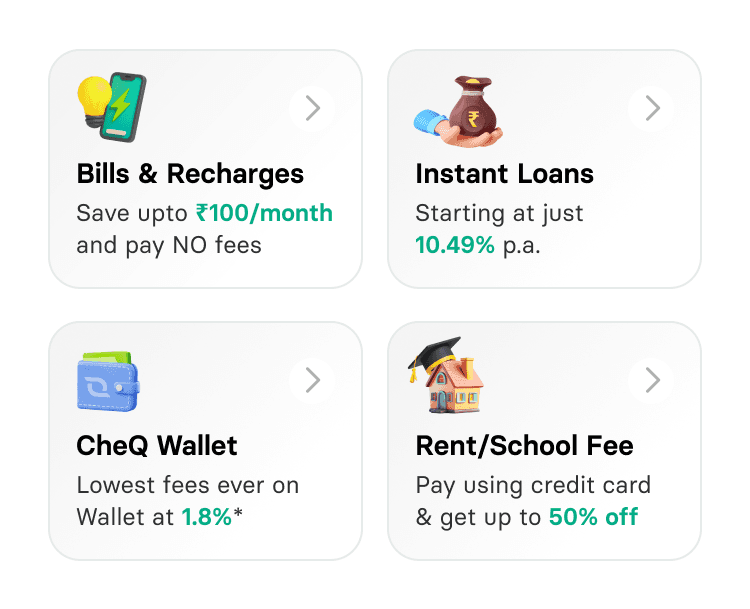
Our interim solution proved that a tile-based layout improved product discovery, but it lacked personalization. All users saw the same static banners, regardless of their needs or behavior.
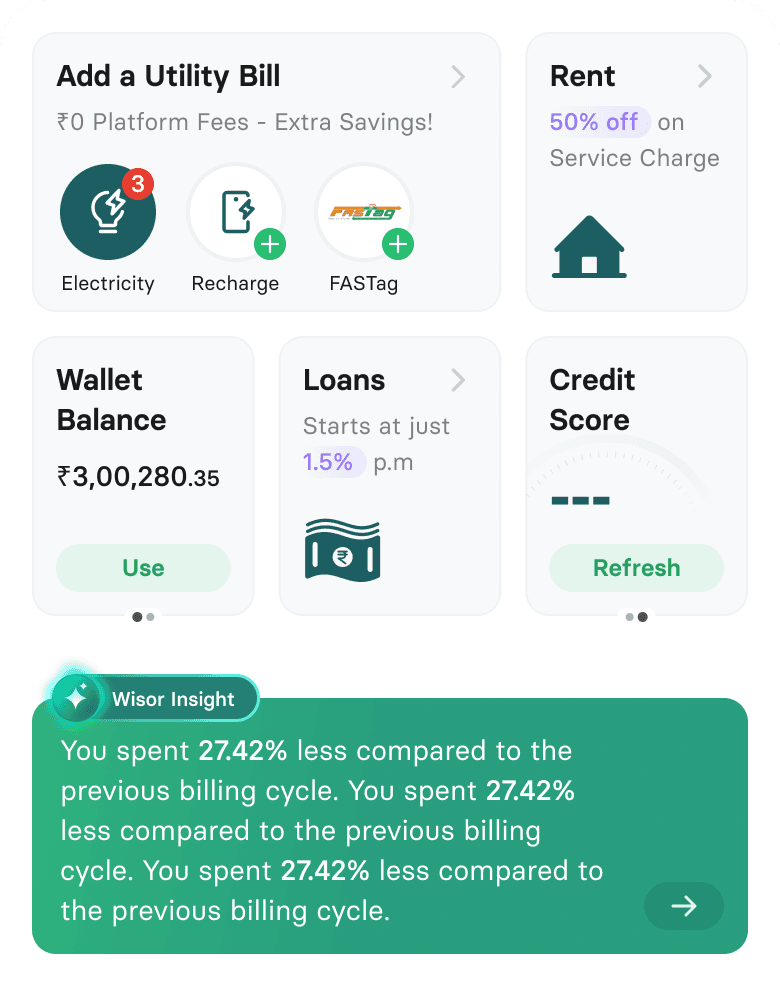
The new Bento Layout is powered by a personalization engine. It dynamically arranges tiles to surface the products most relevant to each user. For example, a user who frequently pays utility bills will see the utility tile prominently displayed. The layout also ensures that a user is never shown products they're ineligible for or uninterested in.
Value Driven Content: Each tile clearly communicates the value to the user, such as the exact chip discount or offer. This makes the tiles feel like a personalized benefit, not a generic ad.
Smart Nudges: The Utility tile strategically nudges users to "Add a Bill" instead of paying directly. This low-friction entry point reduces drop-off by removing the commitment of a full payment flow on first interaction.
Contextual Actions: A subtle scroll action appears on a tile when a pending action is available (e.g., a dropped loan application or a credit score refresh). This provides a quick access point for users and a powerful conversion opportunity for PMs.
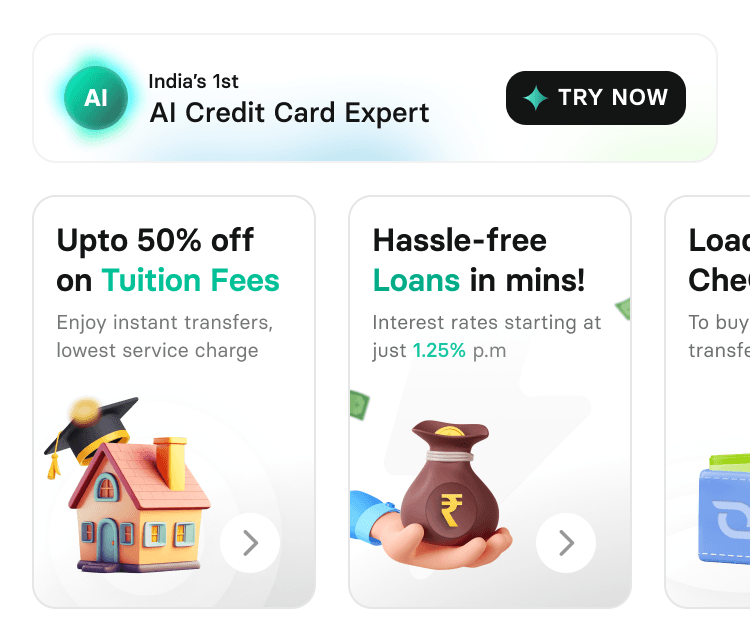
Our AI-powered insights product, Wisor, struggled with visibility. Users perceived its homepage banner as an external advertisement, leading to low click-through rates.
We moved Wisor insights directly onto the homepage, placing them below the Bento layout. By integrating a "Wisor Insight" card into the homepage feed, we changed its perception from an external advertisement to a core CheQ feature.
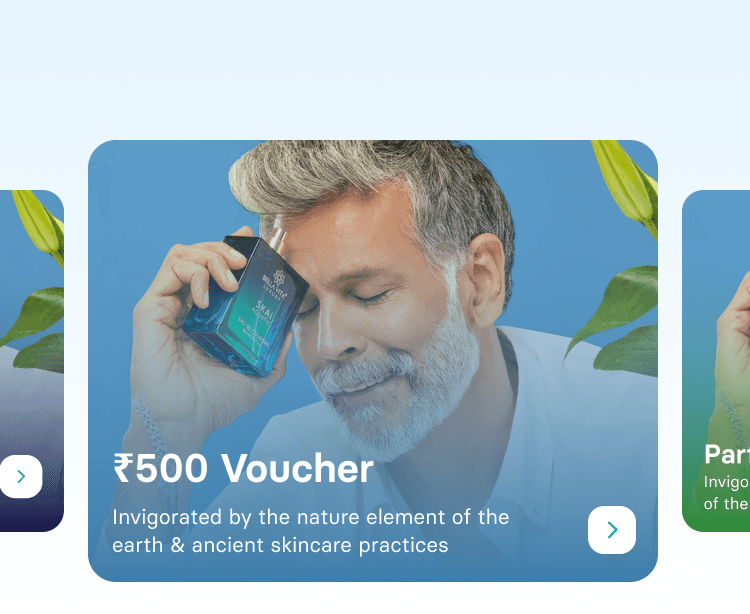
The most valuable Chip redemption options, such as purchasing gift cards and vouchers, were buried deep within the rewards section, making them difficult for users to discover.
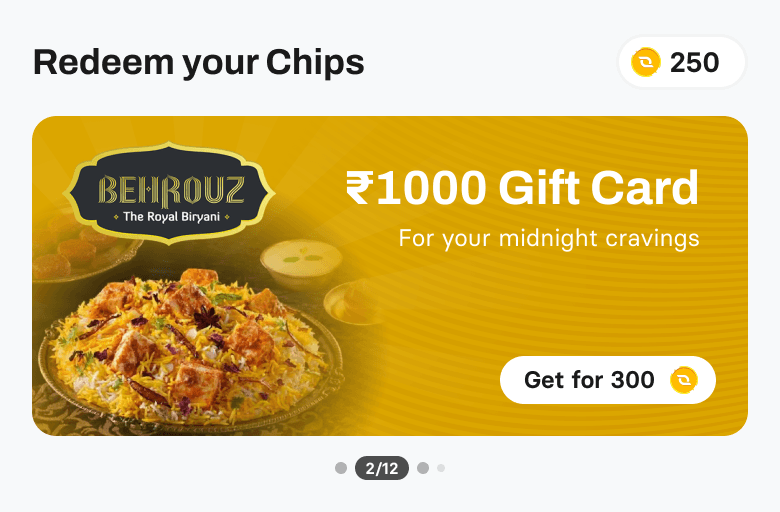
We now have a dedicated "Redeem your Chips" section on the homepage. This strategic placement allows both new and existing users to quickly discover the full value of their earned Chips. We received positive feedback from long-time users who stated they were previously unaware of these valuable redemption options.
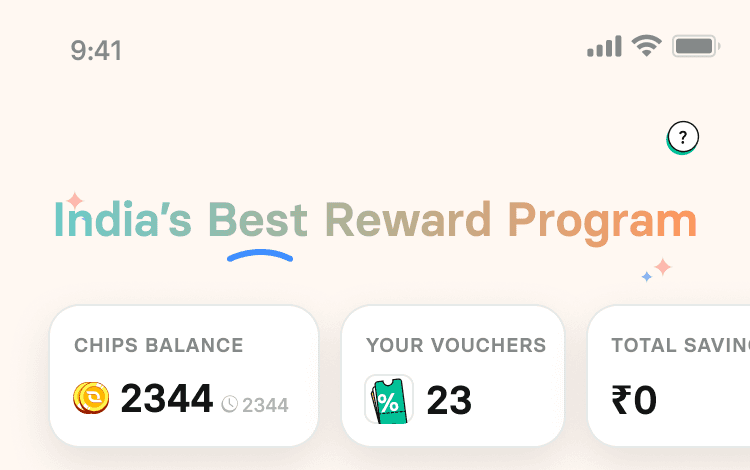
Both users and stakeholders felt that CheQ's homepage didn't adequately communicate its full rewarding potential. The perception was that the only way to earn Chips was by paying credit card bills
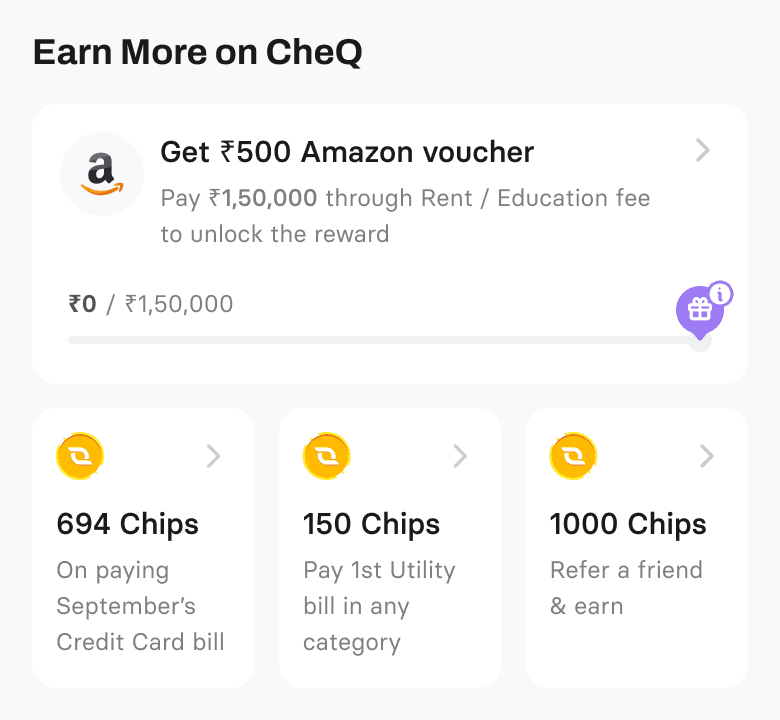
A new section, "Earn more in CheQ," is now prominently displayed. Positioned after the user has seen the value of redeeming chips, this section is a contextual response to the thought, "I want more chips, how do I get them?" It showcases every available way to earn chips, encouraging users to explore other products and reinforcing CheQ's position as the most rewarding bill payment app.
RESULTS
The new homepage went live in September 2025. Here is what the data showed in the first 3 months post launch.
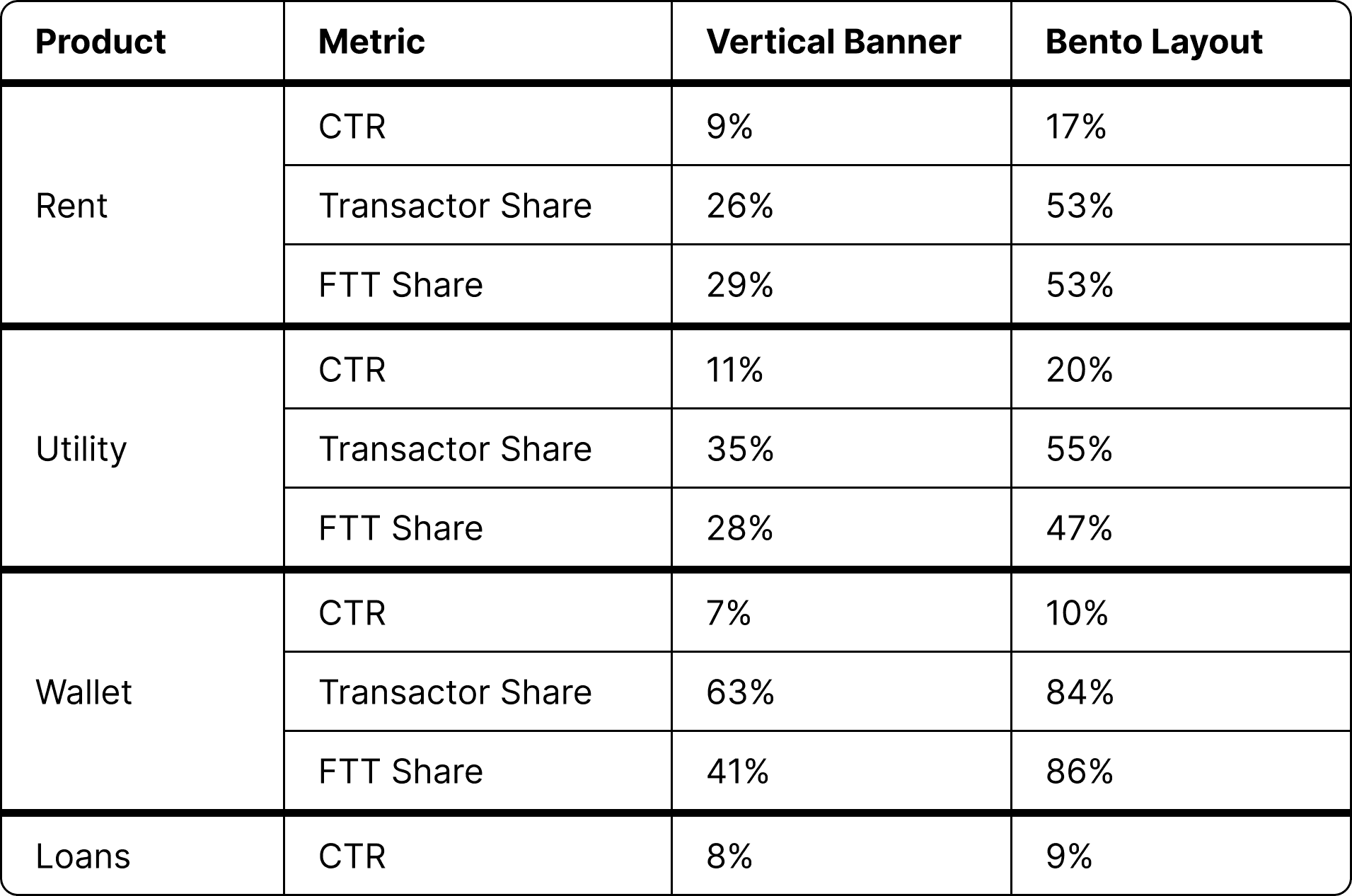
Transactor share roughly doubled across Rent and Utility.
Wallet FTT share went from 41% to 86% the clearest signal that the old system had been hiding a discovery problem, not a demand problem. The users who needed the Wallet existed all along. They just couldn't find it.
Utility bill adds increased by 8%, driven by the low-friction "Add a Bill" nudge on the Bento tile
Wisor visits increased by 12% in the first week after moving insights from a banner to an integrated homepage card
Partner ad surface is now live with a clean baseline for impression and CTR tracking. Previously there was no dedicated placement
Connect to Content
Add layers or components to infinitely loop on your page.


THANK YOU!

Connect to Content
Add layers or components to infinitely loop on your page.
Connect to Content
Add layers or components to infinitely loop on your page.
WORK IN
PROGRESS
MOBILE VERSION
Please try this site in your Desktop for the best gaming experience
aksho.co
Connect to Content
Add layers or components to infinitely loop on your page.